Project 01 · Mobile app

ToGather.

Together, simply. Join outings near you and meet people for real: in groups, with no swiping, for free.

Available iOS 14+ & Android 8+ · Designed in Bordeaux · Over-18s only

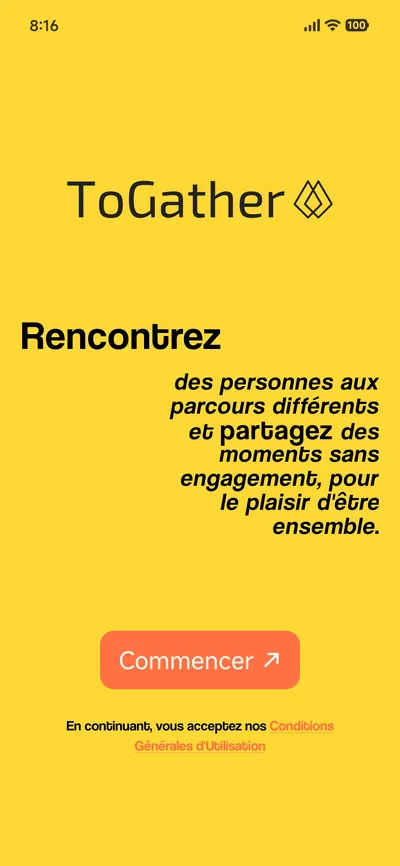
ToGather welcome screen: “Meet people from different backgrounds and share moments with no strings attached, for the pleasure of being together”, with a Get started button.

The problem

Meeting new people has become complicated.

Our cities are full of people and our phones full of contacts… and yet more and more of us live inside our own social bubble.

Existing apps often bank on swiping, never-ending conversations and screen time — rarely on real shared moments. ToGather starts from a different principle: digital technology in the service of real life, with social mixing seen as an asset.

  1. Social bubbles

    We mostly meet people who are like us, and fewer and fewer new faces.

  2. Time-consuming apps

    Swipes, perfect profiles, endless chats: lots of screen time, very few real meetings.

  3. ToGather's answer

    Group outings, organised by an algorithm, with no swiping and no pressure.

How it works

You suggest, the algorithm invites.

In ToGather, nobody chooses whom to invite: that's the algorithm's job. You can be active and suggest outings, or stay passive and simply receive invitations.

  1. Create your profile

    Your interests, your availability slots and your meeting ranges: an “instant” range for same-day meetups, and a “scheduled” range for the days that follow.

  2. Choose a mode

    Balanced, to share a moment with profiles close to yours, or Discovery, to step outside your comfort zone.

  3. Suggest a meetup…

    Activity, mode, number of participants, place, date: the algorithm takes care of inviting the ideal people. Instant (the same day, 30 minutes from now at the earliest) or scheduled (up to 14 days ahead).

  4. … or get invited

    Turn on notifications and wait: invitations arrive during your time slots, within your ranges. You have 30 minutes to reply to an instant meetup, and 2 hours for a scheduled one.

  5. Meet up, as a group

    A group chat to coordinate, then the meetup itself: always with several people, never one-to-one for now.

Suggest a pretend meetup and see the algorithm in action

The ToGather experience

Two modes, one algorithm.

Each profile is described by many criteria (age, interests, background…). Depending on the mode chosen for the meetup, the algorithm brings profiles closer together… or sets them further apart.

Balanced mode

Profiles close to yours

Meet people who are like you: the algorithm narrows the gap between the profiles in the group, for easy-going conversations.

  • Similar profiles (age, interests, background)
  • Common ground to break the ice
  • Ideal for comfortable meetups

Discovery mode

Social mixing, guaranteed

Step outside your comfort zone: the algorithm maximises the group's diversity and puts you in touch with people whose backgrounds differ from yours.

  • Generational, social and cultural diversity
  • Fresh points of view
  • Unexpected experiences

The mode is chosen for each meetup suggested and shown on every invitation received. Either way, safety rules apply before every invitation.

Exp. 002 — Mini-game

So, which mode are you?

Four questions, thirty seconds, no data collected. Just to find out which mode to start with.

Which mode are you?

Loading the quiz… (JavaScript required)

4 questions

What ToGather offers

Designed for real life.

Algorithmic matching

Suggest an outing and let the algorithm invite the participants, or simply wait for invitations to come in. No swiping.

Instant or scheduled

Coffee within the hour? That's an instant meetup. Your weekend? A scheduled meetup, up to 14 days in advance.

Time slots and ranges

You only receive invitations when you're available and within your ranges. Once you've said yes to a meetup on a given day, no more invitations that day.

Always in a group

Meetups with several people, plus a group chat to get organised. Never one-to-one for now.

Safety and moderation

Reporting and blocking in just a few taps, active moderation, and zero tolerance for inappropriate behaviour.

Protected data

GDPR compliance, hosting in the European Union, explicit consent for sensitive data, and no data ever sold.

Free

Quality over quantity.

Access to the community, creating meetups and taking part are all free. Monthly limits prevent spam and give everyone a chance to be invited.

Premium and Ambassador plans raise these limits. All the terms are set out in the ToGather FAQ (opens in a new tab).

7meetups a month, free of charge
2meetups suggested per month
30 minto reply to an instant invitation
14 daysahead, at most, to schedule a meetup

The app, screen by screen

Six screens to understand ToGather.

Real screenshots of the app, from choosing your mode to your privacy settings.

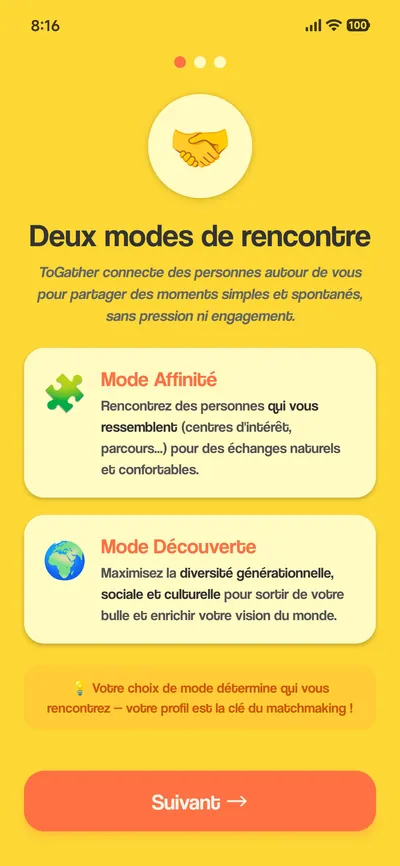
  1. “Two ways to meet” screen: one mode to meet people like you, and Discovery mode, which maximises generational, social and cultural diversity.
    01 Pick your mode Similar or different profiles: the mode steers the algorithm that builds the group.
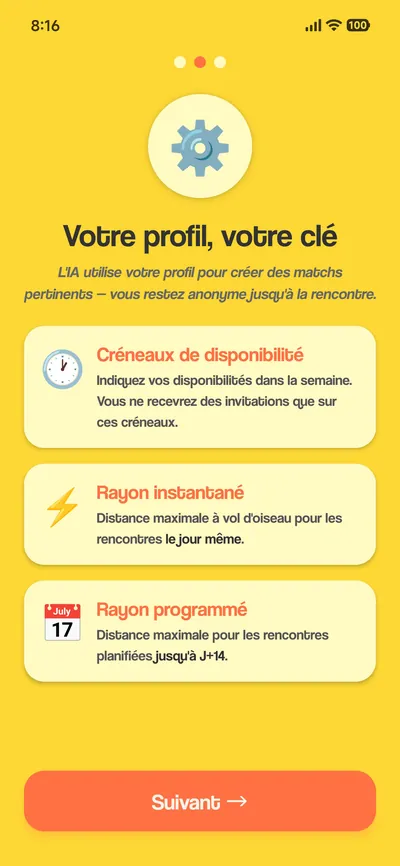
  2. “Your profile is your key” screen: availability slots, an instant range for same-day meetups and a scheduled range up to 14 days ahead. You stay anonymous until the meetup.
    02 Set your time slots Your time slots and range: you only get invitations when you're free, close to you.
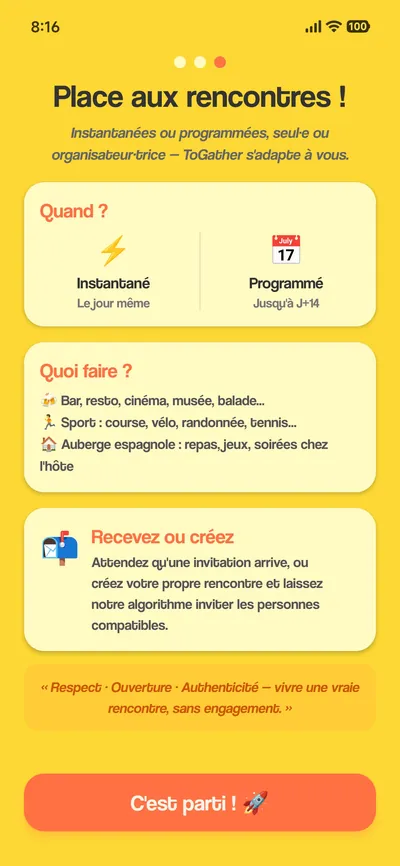
  3. “Time to meet!” screen: instant same-day meetups or scheduled up to 14 days ahead; outing ideas (bar, museum, sport, potluck); receive an invitation or create your own meetup.
    03 Now or later Instant or scheduled meetups: receive an invitation or create your own.
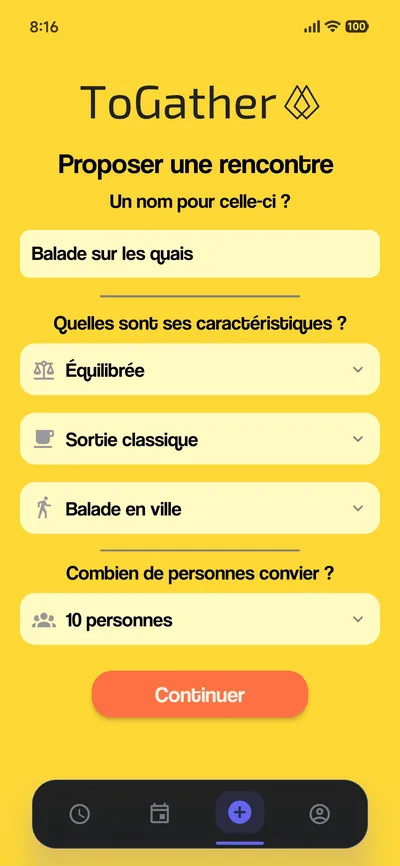
  4. “Suggest a meetup” screen: “Walk along the riverside”, Balanced mode, classic outing, city walk, 10 people invited.
    04 Suggest a meetup A name, a mode, an activity, how many people to bring together: the algorithm handles the invitations.
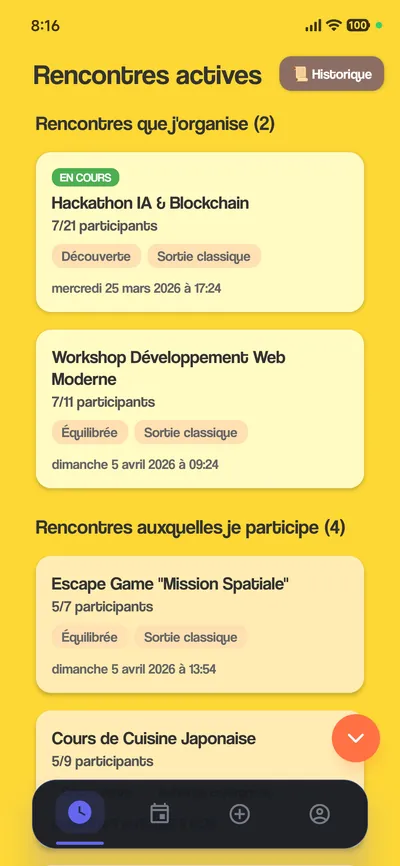
  5. “Active meetups” screen: a hackathon (7 of 21 participants, Discovery mode), a web development workshop, an escape game, a Japanese cooking class.
    05 Track your meetups The ones you suggest and the ones you take part in: always in groups, from 5 to 21 participants.
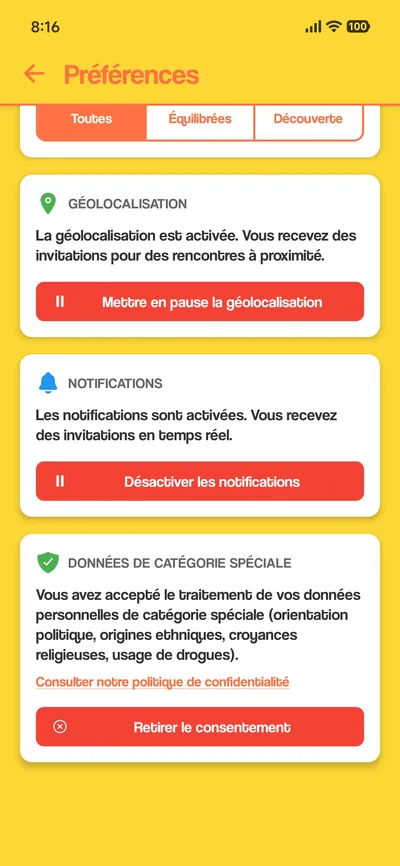
  6. “Preferences” screen: pause location sharing, turn off notifications, withdraw consent for special-category data processing.
    06 Stay in control Pause location, manage notifications, withdraw consent: one tap each.

ToGather in real life

Who is it for?

Newcomers

Just moved? Suggest an outing or let the invitations come to you, and quickly build a local circle. Read our guide

The curious

Keen to meet people who are different from you and step outside your bubble? Discovery mode is made for you.

Activity enthusiasts

Suggest your favourite activity — a hike, board games, an exhibition — and the algorithm finds the participants for you.

Our compass

The app that gets you out, not the one that keeps you in.

No need to hang around on ToGather: fill in your profile, turn on notifications, and the app takes care of finding people to share a moment with. The rest happens in real life.

Frequently asked questions

ToGather at a glance.

All our questions The full ToGather FAQ (opens in a new tab)
What is ToGather?

ToGather is 2G Labs' mobile app for joining group outings near you and meeting people for real, with no swiping. It is available on iOS and Android, for adults living in France. Learn more at togatherapp.fr.

How are the people invited to a meetup chosen?

Nobody invites anybody: you suggest a meetup (activity, mode, number of participants, place, date), then a probabilistic matchmaking algorithm invites the participants. It sends invitations in batches, recalculates the group's make-up after each acceptance, and applies safety rules before every invitation. You can also stay passive and simply receive invitations to meetups suggested by other members.

What is the difference between Balanced mode and Discovery mode?

In Balanced mode, the algorithm favours profiles close to yours (age, interests, background) for easy-going conversations. In Discovery mode, it does the opposite and maximises the group's diversity: people from different backgrounds, for social mixing. The mode is chosen for each meetup suggested, and shown on every invitation received.

Is ToGather free?

Yes. Using ToGather is free with no compulsory subscription: you can take part in up to 7 meetups a month (2 suggested and 5 joined). Premium and Ambassador plans raise these monthly limits.

Can I organise a last-minute outing?

Yes. An instant meetup takes place the same day, at least 30 minutes after it is created; invitees have 30 minutes to reply. A scheduled meetup can take place from the next day up to 14 days ahead, with 2 hours to reply.

Are meetups one-to-one?

No. For now, ToGather meetups always take place in groups. Reporting, blocking and active moderation complete the safety measures.